• submit tip •


iOS 4 Anti-Aliasing Demonstrated in both 'Real Racing' and Upcoming iPhone 'Zen Bound 2'

posted June 23rd, 2010 3:31 PM EDT by Eli Hodapp in Games, iPhone games, iPod touch games, Upcoming Games

While we're all busy fiddling with multitasking and obsessively organizing our apps in to folders, developers are hard at work to fully utilize all the other things under the hood of iOS 4. Firemint and Secret Exit are among the first studios taking advantage of iOS 4's new anti-aliasing capabilities.

Anti-aliasing is used to minimize jagged edges found in curved and diagonal lines displayed utilizing the grid of square pixels that make up the displays we use today. Using anti-aliasing, the GPU of the iPhone intelligently decides what color to display on pixels that border the edges of 3D objects to make them blend in to the background and appear more crisp.

As you can see from the above image, the A on the left has no aliasing, while the edges of the A on the right have been blended with the background color. This is a gross over-simplification of how anti-aliasing works, but if you weren't aware before it will at least give you an idea of what you're looking at in the following sets of screenshots:
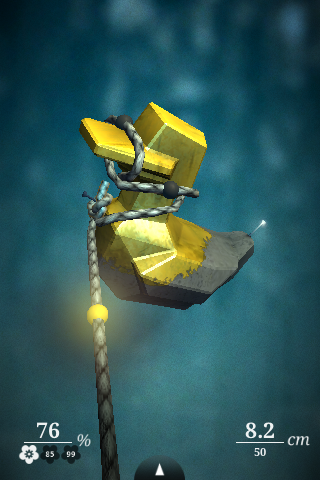
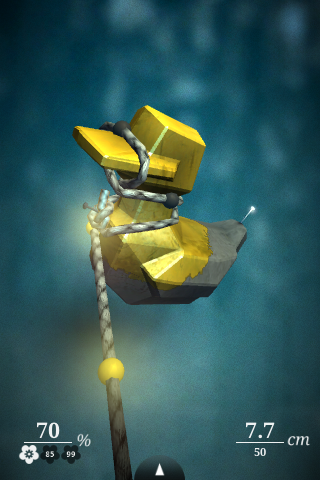
The effects of the anti-aliasing is incredibly apparent when you focus on the bill of the duck in both images. Secret Exit also posted additional screenshots in our forums, and in a second post explaining the technical details of anti-aliasing in Zen Bound 2 which mentions the performance cost being too high to utilize the effect in older devices.

In somewhat related Zen Bound 2 news, they also announced that it will soon be available on multiple platforms. Joining the existing iPad Zen Bound 2 [$4.99] is an upcoming iPhone, iPod touch, PC, and Mac version. Recent MacBook owners will be able to use the multi-touch trackpad or even a Magic Mouse to control the game just like the iPhone.

Real Racing [$4.99] saw an update yesterday which not only made the game iPhone 4 friendly complete with high resolution graphics, but also brought anti-aliasing to the iPhone 3GS and 3rd generation iPod touch. It might not have been immediately obvious when you fired up the game since updating, but take a look at a screenshot I took today compared to a screenshot captured for our our review over a year ago:
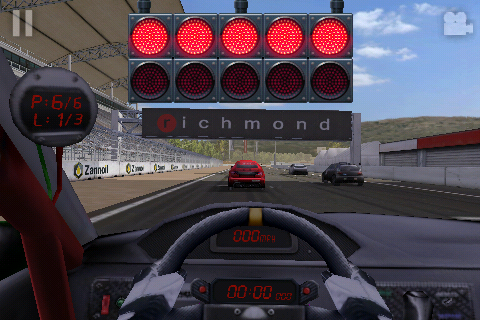
Looking at the line following the top of the dashboard, the A pillar of the car, and edges of the banner over the makes the new anti-aliasing really pop out comparing the two screenshots. This is only the tip of the iceberg, too. Now that new features like this have been unlocked for developers, it should be really fun to see what they come up with.

Anti-aliasing being supported by the iPhone 3GS and 3rd generation iPod touch is also good news for people who might not be immediately upgrading to the iPhone 4. While you'll obviously be lacking the Retina Display, if developers start implementing anti-aliasing in all their 3D games, everything will look substantially better on your existing device without needing to do anything other than download some game updates.

Support Our Sponsors:

  • SalsaMD

    Hopefully gyroscope support with Zen Bound 2 on the iphone4....

  • SalsaMD

    Hopefully gyroscope support with Zen Bound 2 on the iphone4....

  • Doomboy

    Okay, I think I'm addicted to anti-aliasing... So glad I have a 3rd Gen iPod Touch! :D

  • Doomboy

    Okay, I think I'm addicted to anti-aliasing... So glad I have a 3rd Gen iPod Touch! :D

  • Byron

    Zen Bound 2 is still $7.99 on itunes not $4.99

  • Byron

    Zen Bound 2 is still $7.99 on itunes not $4.99

  • Athlos

    Um, anti-aliasing has a big impact on performance and is unnecessary on a retina display, why would anyone implement this for the iPhone 4?

    • Doomboy

      As Secret Exit said in their post, it seems to make most sense for the 3rd gens, but none of the others really

      • http://www.secretexit.com Frand

        To clarify, the post I wrote about AA referred specifically to its application in Zen Bound 2. Enabling AA on older devices and whether it affects frame-rate in a visible way is a choice up to each developer.

        Zen Bound 2 is making the most of the older devices as it is, for our game AA influenced performance below the threshold we felt comfortable with for smooth gameplay. 3rd gen hardware is obviously more powerful, so we can have both fluid framerates and smoother visuals with the content we have in ZB2.

        There's never a simple answer, is there? :)
        (Nor a free lunch...)

  • jonini

    -Anti-Aliasing
    -higher resolution
    -a4 more power

    We can expect amazing graphics with the iphone 4 :D
    i think.....

  • Athlos

    Um, anti-aliasing has a big impact on performance and is unnecessary on a retina display, why would anyone implement this for the iPhone 4?

    • Doomboy

      As Secret Exit said in their post, it seems to make most sense for the 3rd gens, but none of the others really

      • http://www.secretexit.com Frand

        To clarify, the post I wrote about AA referred specifically to its application in Zen Bound 2. Enabling AA on older devices and whether it affects frame-rate in a visible way is a choice up to each developer.

        Zen Bound 2 is making the most of the older devices as it is, for our game AA influenced performance below the threshold we felt comfortable with for smooth gameplay. 3rd gen hardware is obviously more powerful, so we can have both fluid framerates and smoother visuals with the content we have in ZB2.

        There's never a simple answer, is there? :)
        (Nor a free lunch...)

  • jonini

    -Anti-Aliasing
    -higher resolution
    -a4 more power

    We can expect amazing graphics with the iphone 4 :D
    i think.....

  • Kerry

    "As you can see from the above image, the A on the left has no aliasing, while the edges of the A on the right have been blended with the background color. "

    To be nit-picky, the A on the left indeed has aliasing.

    Aliasing (in computer graphics jargon) refers to the jagged edges caused by the pixellated representation of displaying things at a lower resolution. "Anti-aliasing" tries to reduce the effect of the jaggedness by interpolating adjacent pixels as you describe.

    If you zoomed in on the anti-aliased text again you'd still see more jaggies, but therein lies the greatness of the retina display. With pixels normally too small to see, the negative visual effect of "aliasing" (the jaggies) can be made almost entirely non-existent.

  • Kerry

    "As you can see from the above image, the A on the left has no aliasing, while the edges of the A on the right have been blended with the background color. "

    To be nit-picky, the A on the left indeed has aliasing.

    Aliasing (in computer graphics jargon) refers to the jagged edges caused by the pixellated representation of displaying things at a lower resolution. "Anti-aliasing" tries to reduce the effect of the jaggedness by interpolating adjacent pixels as you describe.

    If you zoomed in on the anti-aliased text again you'd still see more jaggies, but therein lies the greatness of the retina display. With pixels normally too small to see, the negative visual effect of "aliasing" (the jaggies) can be made almost entirely non-existent.

  • ultimo

    Wow...
    Anti-aliasing makes Richmond read as Forino :P

  • http://doesnothaveoneyet ultimo

    Wow...
    Anti-aliasing makes Richmond read as Forino :P

  • http://www.jindofox.com jindofox

    Diagonals still look jaggy as can be in both screenshots. Hm.

  • http://www.jindofox.com jindofox

    Diagonals still look jaggy as can be in both screenshots. Hm.

  • http://jens.mooseyard.com Jens Alfke

    To be clear, what's new is anti-aliasing *in OpenGL rendered 3D graphics*. The iOS (like Mac OS X) has _always_ supported anti-aliasing in regular text and 2D graphics — just open any regular non-game app, like Mail or Calendar, in iOS 3 and look at the screen with a magnifying glass: no jaggies. It's easier to tell on an iPad because of the lower DPI.

  • http://jens.mooseyard.com Jens Alfke

    To be clear, what's new is anti-aliasing *in OpenGL rendered 3D graphics*. The iOS (like Mac OS X) has _always_ supported anti-aliasing in regular text and 2D graphics — just open any regular non-game app, like Mail or Calendar, in iOS 3 and look at the screen with a magnifying glass: no jaggies. It's easier to tell on an iPad because of the lower DPI.

  • http://apps4review.com/ Chris

    The graphics look a lot better i think with the new anti-aliasing.

    check out the <a href=http://apps4review.com/<best ipod apps

  • http://apps4review.com/ Chris

    The graphics look a lot better i think with the new anti-aliasing.

    check out the <a href=http://apps4review.com/<best ipod apps

  • Brandon

    That's what's been missing from the iPhone... I've always wondered what it is about the graphics... Now I can safely say the the DS has no anti-aliasing either.

    So glad I have the iPod Touch 3rd Gen

    I just tried real racing for myself! WOW

  • Brandon

    That's what's been missing from the iPhone... I've always wondered what it is about the graphics... Now I can safely say the the DS has no anti-aliasing either.

    So glad I have the iPod Touch 3rd Gen

    I just tried real racing for myself! WOW

  • http://www.stormchild.net Stormchild

    Correction: The 'A' on the left *has* aliasing, because there's no anti-aliasing applied to it.

  • http://www.stormchild.net Stormchild

    Correction: The 'A' on the left *has* aliasing, because there's no anti-aliasing applied to it.

  • Jerome

    While I admit the new super-high res displays are cool, I think that games running in 480x320 with AA look great. For me, that's just about at the "good enough" point.

    @Brandon,

    Actually, DS can do anti-aliasing on polygon edges, though not all games use it. The reasons DS graphics look so blocky is a combination of low screen resolution (just under one-third standard iPhone res) and no texture smoothing.

  • Jerome

    While I admit the new super-high res displays are cool, I think that games running in 480x320 with AA look great. For me, that's just about at the "good enough" point.

    @Brandon,

    Actually, DS can do anti-aliasing on polygon edges, though not all games use it. The reasons DS graphics look so blocky is a combination of low screen resolution (just under one-third standard iPhone res) and no texture smoothing.

  • http://www.dot8studio.com Pierre

    It makes no sense to speak so highly of anti-aliasing on the iPhone 4 while at the same time saying how cool the retina display is.
    If the display would be so cool, then there is no need for anti-aliasing as the pixels would be so small that is' not needed anymore.
    But seems like the pixels are not (yet) small enough. :-)

  • http://www.dot8studio.com Pierre

    It makes no sense to speak so highly of anti-aliasing on the iPhone 4 while at the same time saying how cool the retina display is.
    If the display would be so cool, then there is no need for anti-aliasing as the pixels would be so small that is' not needed anymore.
    But seems like the pixels are not (yet) small enough. :-)

  • Jerome

    @Pierre,

    There's nothing nonsensical about recognizing an impressive technical achievement while also realizing it may be a bit excessive for some things. Also, Apple is using anti-aliasing for, among other things, text on the retina displays, and they should. It makes the image look its best at a given resolution, and is more efficient for optimizing image quality than adding more resolution.

    • Jesse

      The point is that once you have a true "retina" display, then any aliasing is no longer visible, so anti-aliasing adds no value. Therefore, if the iPhone 4 looks better with anti-aliasing than without, then the display has not really surpassed the retina as they claim.

      While the iPhone 4 display is outstanding, it is not the breakthrough technology that Jobs makes it out to be. The jump in number of pixels from iPhone 3GS to Droid was a factor 2.67. The jump from Droid to iPhone 4 is 1.5. When you factor in the iPhone's smaller display (and thus, higher pixel density), the jumps are still 2.38 from 3GS to Droid and just 1.68 from Droid to iPhone 4.

      Though impressive, the pixel density on the iPhone 4 is easily within the range of normal technological increments.

  • Jerome

    @Pierre,

    There's nothing nonsensical about recognizing an impressive technical achievement while also realizing it may be a bit excessive for some things. Also, Apple is using anti-aliasing for, among other things, text on the retina displays, and they should. It makes the image look its best at a given resolution, and is more efficient for optimizing image quality than adding more resolution.

    • Jesse

      The point is that once you have a true "retina" display, then any aliasing is no longer visible, so anti-aliasing adds no value. Therefore, if the iPhone 4 looks better with anti-aliasing than without, then the display has not really surpassed the retina as they claim.

      While the iPhone 4 display is outstanding, it is not the breakthrough technology that Jobs makes it out to be. The jump in number of pixels from iPhone 3GS to Droid was a factor 2.67. The jump from Droid to iPhone 4 is 1.5. When you factor in the iPhone's smaller display (and thus, higher pixel density), the jumps are still 2.38 from 3GS to Droid and just 1.68 from Droid to iPhone 4.

      Though impressive, the pixel density on the iPhone 4 is easily within the range of normal technological increments.

  • http://www.peitsch.de Sebastian

    " but take a look at a screenshot I took today compared to a screenshot captured for our our review over a year ago:"

    Meaning: Compare Fig. 1 with Fig 2.

    And then he posts Fig 2 first. Very bright indeed.

    Not even mentioning that he chose:

    - different track
    - different car

    So you see a difference in the A beam of a different car. Marvelous.

    Next time at least TRY to recreate the first picture. The lines on the track are still jagged everywhere and in EVERY friggin racing game I played since "F1 Grand Prix" on my 486 the interiors of the cars were always better than the track itself, because they were sprites slapped on the screen compared to 3D (or pseudo-3D) renderings of the track and opponents.

    But I'm glad that you see the difference. I bet you also buy HDMI cables with golden connectors. Makes those 1 and 0 flow even better, rigth? *sigh*

  • http://www.peitsch.de Sebastian

    " but take a look at a screenshot I took today compared to a screenshot captured for our our review over a year ago:"

    Meaning: Compare Fig. 1 with Fig 2.

    And then he posts Fig 2 first. Very bright indeed.

    Not even mentioning that he chose:

    - different track
    - different car

    So you see a difference in the A beam of a different car. Marvelous.

    Next time at least TRY to recreate the first picture. The lines on the track are still jagged everywhere and in EVERY friggin racing game I played since "F1 Grand Prix" on my 486 the interiors of the cars were always better than the track itself, because they were sprites slapped on the screen compared to 3D (or pseudo-3D) renderings of the track and opponents.

    But I'm glad that you see the difference. I bet you also buy HDMI cables with golden connectors. Makes those 1 and 0 flow even better, rigth? *sigh*


SUPPORT OUR SPONSORS