Best TextTwist for iPhone: Word Whirl, Sextuple Word Challenge, Lexitron

posted August 18th, 2008 11:44 AM EDT by arn in $0.99, $1.99, $2.99, Reviews

After TouchArcade forum user ReformatPlanet pointed out a particularly polished new word game called Lexitron [$1.99, App Store], we sat down and went to work on evaluating this promising title. We quickly realized, however, that Lexitron was just one of several versions of the popular web-based TextTwist game.

TextTwist is a simple game where the player is given 6 jumbled letters and is expected to make as many words out of them as possible. The player is given the total number of possible words as well as the number of letters in each word. There’s no penalty for guessing but you are on a time-limit. Words can be anywhere from 3 to 6 letters long.

We found the following TextTwist clones in the App Store:

  • Word Warp v1.01 [$0.99] - not recommended
  • Muddled v1.0.1 [$1.99] - not recommended
  • Word Whirl v2 [$2.99] - global high scores, multiplayer
  • Sextuple Word Challenge v1.0.0.1 [$0.99] - best overall pick
  • Lexitron v1.0[$1.99] - visually impressive, multiple languages

Not Recommended: Muddled and Word Warp

The first two titles listed, Word Warp and Muddled, are simply not recommended when directly compared to the other offerings in this roundup. Word Warp is a bare bones implementation with a very simple interface and no sound effects.

While Muddled appears to be a slightly better implementation, its fatal flaw is that it houses the jumbled letters at the top of the screen. In all the iPhone versions of this game, the player selects the letters simply by touching them. With that in mind, let me point out that there’s a reason the iPhone keyboard is on the bottom of the screen and not the top. You simply don’t want your hand and fingers obscuring the screen when typing (or selecting letters in a game).
Top Pick: Sextuple Word Challenge

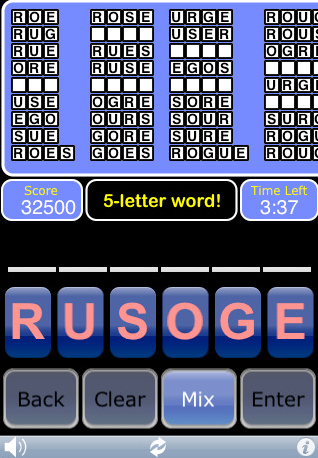
Surprisingly enough, one of the $0.99 cent options was our top pick. Sextuple Word Challenge provides the best overall experience. The user interface is well thought out with responsive buttons on the bottom of the screen. The large simple buttons work well.

There are some basic sound effects which get the job done and most importantly, the game saves state when you quit or when you get a phone call. This means you can resume right where you left off.

The rules for Sextuple Word Challenge are better suited for less experienced players. The player is given a variable amount of time depending on how many word solutions there are. You only need to get 50% of the words in order to progress to the next level. A single high score is stored and is initially set at 10,000.

One minor complaint is that the blank words are not listed in alphabetical order as is the convention for most of the other apps. During gameplay, this ordering can help provide you with some hints for unknown words. There have also been complaints that the built-in dictionary does not carry enough words. If you consider yourself an advanced player, this may be an issue.
Word Whirl

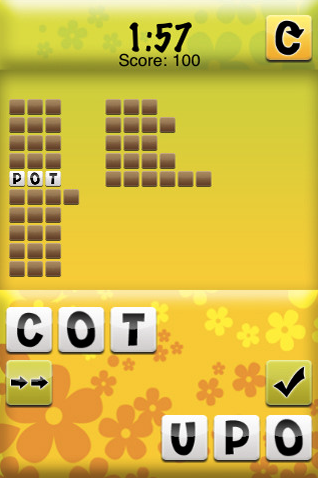
Word Whirl is also a solid version of TextTwist. It features a very similar interface to Sextuple Word Challenge that is also quite responsive. The game also provides a few unique features including global online high score as well as a Wi-Fi multiplayer version. The Wi-Fi multiplayer works as advertised (but with one issue mentioned later) and provides a very fun head-to-head method of play.

The game requires a bit more skill in order to advance stages. In order to pass the current stage, you actually need to get every word, and you only get two minutes to start, regardless of how many possibilities there are. Time is added to the clock for every word with 4 letters or more that you find. These rules combined with the global online scoreboard may appeal to the more advanced player.

What really keeps us from highly recommending this game, however, is the fact that it does not save game state upon quit. This means going back to the home screen or receiving a phone call will lose your game. While Wi-Fi multiplayer mode seems to be a very fun way of playing the game, iPhone dialog boxes (low battery, SMS messages) will result in a disconnection between the two iPhones.

Lexitron

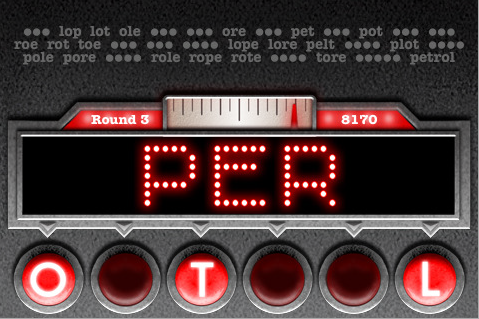
Lexitron is the most visually impressive of the bunch with an arcade game style and smooth animations. Also unique to this version is support for multiple languages including English, French, Italian and Spanish.
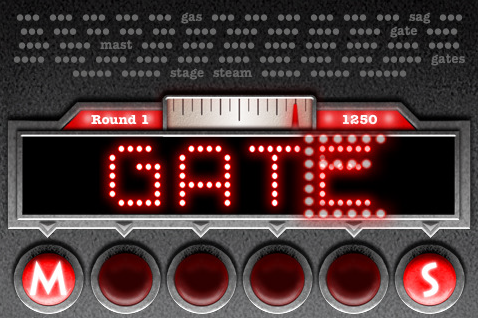
This game’s rules require that you complete at least one six-letter word before proceeding to the next stage. The game is played in landscape mode only which feels quite natural while typing. From the options, you can choose 1:30, 2:00, 3:00 or unlimited time for each stage.

Lexitron’s interface is hidden from sight. Shuffling of letters can be performed either by shaking the iPhone or double tapping on the empty space. Letter selection is by touch and word entry is by double-tap near the bottom. While visually impressive and enjoyable, the overall gameplay of the other versions reviewed felt more natural. While the game does save game state when you quit, there is no way to end a level or return to the menu in mid play.

Summary and Gameplay Video

Sextuple Word Challenge [$0.99], Word Whirl [$2.99], and Lexitron [$1.99] are all good versions of TextTwist for the iPhone. If not for its inability to save game state, Word Whirl may have been our top choice. For those impressed by fancy visuals or in need of multiple languages, Lexitron is a a solid choice. But for the best overall playability and value, Sextuple Word Challenge is our top choice.

Gameplay video shows these games in action:

12 Responses to “Best TextTwist for iPhone: Word Whirl, Sextuple Word Challenge, Lexitron”

  1. mark Says:

    [Making a correction to my post above. Please add a way for us to edit our comments, in case of typos.] :-)

    “Fatal flaw?” I can’t believe you’d completely discount Muddled, simply because its letters are at the top of the screen. I agree with you that placing the letters at the bottom would be a friendlier design, but I wouldn’t call the current design “fatal.”

    On the other hand, you guys don’t seem to care about UI design. “Sextuple Word Challenge” is flat-out ugly — which, for me, is a “fatal flaw” — yet it’s your “top pick.” I want functionality and ergonomics, as well as an attractive appearance. I don’t care how great a game is — if it’s ugly, I’m not going to buy it. At least Muddled is rather attractive, which, for me, puts it head-and-shoulders over the ugly “Sextuple.”

    My #1 issue with games is that most of them are simply ugly to look at. But apparently, that’s not an issue for you guys, which is unfortunate. Why are game designers so oblivious to good design? And how are games going to improve, if reviewers don’t tell the developers that they’re ugly?

  2. arn Says:

    mark,

    Have you played the other versions? There’s no question in my mind the gameplay of the ones listed are much better than Muddled. Besides covering the screen, it’s awkward to play Muddled one handed, and you can’t correct a single letter. There are no sound effects. But yes, when compared to the other games, the choice of input is its fatal flaw, because for cheaper, you can get a better input method. or for the same price you can get a prettier game (also with better input).

    If you care entirely about visual design, then Lexitron is the clear winner. (Muddled isn’t especiallya pretty) If you care about practical gameplay, Sextuple is.

    arn

  3. Loren Says:

    I’ve been playing Muddle because it’s the one I saw first. It was one of the first games I downloaded. I do like it and have been playing it pretty regularly.

    I can understand the complaint about the letters at the top, but it really never bothered me. I like the fact that the UI is very clean though…no clutter.

    One aspect I do like about the letters at the top of the screen is that it is a natural focus point and makes it easier for trying to find new words. At the bottom, I would be distracted by all of the words I’ve found.

    Other plus features are the shake/scramble, save state, end game in round, vibration warning for low timing and different difficulty settings based on number of words found as opposed to getting one of the 6 letter words. It also offers Landscape/Portrait mode.

    One interesting feature of Muddle is that it keeps track of the best score for that letter set. So if you do that letter set twice, you can see if you did better or worse than last time. I’m not sure if the other games have that or not.

    I don’t want sound effects for that type of game…I’d rather listen to music. It does have vibration warnings which is good for me.

    Anyway, I would hardly call Muddle a not-recommended. It’s definitely fun and for $2, I feel like I’m getting my money’s worth. I’ve not played the others, but judged on the value, I give it thumbs up and would not have panned it so quickly.

  4. Mike Says:

    “and you can’t correct a single letter.”

    Well you sorta can… you can drag and drop letters to and from the entry bar, so if you need to either remove a letter or place a different one first, you can.

    My thoughts on Muddled basically mirror Loren’s last paragraph, though I think some very minor sound effects might give the game a little more life. I also haven’t played the others since I was satisfied with Muddled, so I can’t comment on them. One thing I like is its multiple levels of difficulty, and while bare-bones (but clean), I still think it’s easier on the eyes than the Sextuple game.

    I can’t tell from the video, but in Sextuple, do you have to scroll sideways sometimes to see the whole word list? Not sure I’m cool with that.

  5. BeyondtheTech Says:

    As much as I like WordWhirl, since it was the second of the TextTwist-like games I found on the AppStore, the gameplay is slightly different. Maybe I’m just not as eloquent on my vocabulary, but I have a hard time getting every word before the end, but as long as you get the six-letter word, you can tap the “whirl?” button on the upper-right corner and it will skip to the next jumbled word. But, the time doesn’t reset with the new word, so I never get to finish that round.

  6. Brandonzar Says:

    Out of the games you listed I would have to say I like Muddled the best, I haven’t played word warp or word whirl though. I agree that muddled needs some improvement though, I sent the developer an e-mail several weeks ago and I’ll post it here along with his reply. I really like that muddled uses seven letters, it makes for more challenging game play for me.

    Hi Brandon-

    Thanks for this list. It’s really helpful to hear from different players on their experiences with the game. Up until the App Store launched, my only feedback was from a couple friends that I had testing it.

    The layout change is a great idea (putting the unselected tiles at the bottom of the screen). I’m also thinking of ways to shuffle the pixels around to make the tiles bigger, or at least make the “hit” area bigger than the tile itself. I also really like the suggestion of linking to an online dictionary.

    I’m planning what features to put into a 1.0.2 release in the near future and will definitely try to get a few of your ideas in there. I’ve already submitted a 1.0.1 update to Apple that eases up on the difficulty settings, and filters a few additional offensive words that I missed in the first release. Just waiting for Apple to approve it.

    Thanks again-

    –Brian

    On Jul 21, 2008, at 2:47 PM, Brandon wrote:

    Some tips on how to improve Muddled:

    ● Put the unselected tiles at the bottom of the screen so that your hands don’t cover up the spelled words.
    ● Make the tiles bigger.
    ● Use a double tap to submit words instead of a button.
    ● Clear the selected letters after each submission even if the submitted letters don’t spell a real word (get rid of the x button it slows the game down).
    ● Get rid of some of the more obscure words or reserve them for higher difficulty settings.
    ● Give a large visible cue indicating wether the submitted word was valid, invalid, or a duplicate entry.
    ● Use variable timing for letter sets with more possible words (this may already be in place, but I can’t discern the difference).
    ● Make a challenge mode like in Quordy, or even better, a live challenge mode.
    ● Make a settings menu and have the option to lock the screen in portrait or landscape, I prefer landscape.
    ● Make a high scores list with names so that if others play on the device you can see what they got.
    ● Reduce the shaking force required to mix the letters.
    ● Return the letters to the tray in the order they were last used.
    ● List the possible words in alphabetical order.
    ● Link the list of possible words to Google or Wikipedia so that unrecognized words can be looked up and learned at the end of the game (if this is possible).

    Thanks,

    Brandon

  7. Glen Raphael Says:

    I bought sextuple on your recommendation and (as a serious scrabble/boggle player) am indeed finding the limited dictionary a problem. I keep coming across situations where it won’t allow the words I want to enter, which is frustrating.

    Some words I noticed aren’t in its dictionary in a recent session: don, hie, gyre, fain, fie, shit, floe. Or any english letters (cee, dee, ess…).

    Meanwhile it the dictionary *does* include a few dubious words such as “dos”. I suppose one might consider that the plural of “do” the musical note, but I’m not really buying it.

  8. Skrat Says:

    My initial purchase was Muddled but I have to agree with both the review. But along with the review’s complaint, I have to also add that I thought letter selection on it to be very slow and as already mentioned, removing single letters is not very user-freindly. I really regret the purchase. Sextuple was one I avoided mainly because of the look of it. It seemed to me that the designer wasn’t very interested in making a decent interface.

    With all that said, my selection for top pick is Lexitron. It is fast, has a good dictionary, and is graphically superior to all the other games. JMHO.

  9. arn Says:

    Sextuple had an updates today. Added a lot more words and puzzles. I couldn’t tell if it had more of a dictionary. Anyone notice?

    arn

  10. GeeBee Says:

    Since this review was originally posted, Sextuple Word Challenge seems to have corrected the most major complaints. The graphics have been re-done and looks far better than the screen capture on this review. Additionally, the solved words are now listed in alphabetical order and the dictionary seems to be far improved as well.

    The biggest complaint I have about it is the “Info” button is directly below the “Enter” button where I occasionally hit it instead of Enter. Which isn’t much of a complaint more than me being clumbsy.

    Anyway try the free trial and judge for yourself.

  11. Dave Says:

    I love texttwist games, but hate the time clock feature. It would be nice to have the option (maybe a preferences pane that lets you turn on or off the count-down timer) of doing without the time pressure.

    Keep up the great work!

  12. Dave Says:

    It’s very easy to miss the Enter button and instead press the “i” (info?) button. This should be moved or eliminated.

    Also, make use of the shake function of iPod & iPhone: maybe shake to start a new game?

Leave a Reply

*
To prove you're a person (not a spam script), type the security word shown in the picture. Click on the picture to hear an audio file of the word.
Click to hear an audio file of the anti-spam word


SITE SPONSORS