 Machinarium [$4.99] is a treasure, judiciously and efficiently designed, with not a single pencil-drawn sprite out of place.
It was worthing playing on the PC two years ago, it will be worth playing on the PlayStation 3 later this year, and it’s worthing playing on your iPad 2 right now.
The “story" of Machinarium — Amanita Design’s first full-length effort — is unobtrusive and elegant, told entirely through the unnamed protagonist-bot’s thought bubbles and context clues. There is no human speech to parse, no dialogue trees to navigate, no lengthy exposition to ignore — Jakub Dvorsky and his team have a laser-sighted focus on puzzle design.
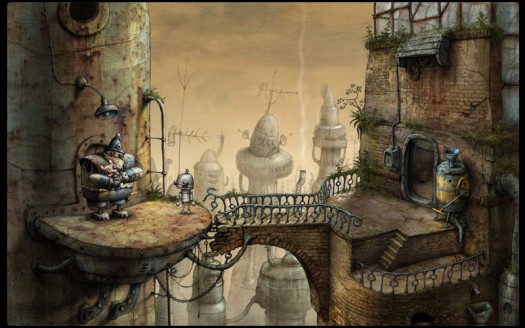
And what puzzles they are! Machinarium features a mix of traditional logic problems and modern, multi-step inventory manipulation puzzles that, by and large, fall into the range where challenge and critical thinking intersect. The result is a game that feels organic and internally consistent, with none of the arbitrary, “guess-what-the-designer-wants" logic that so often plagues puzzle games.
If you do happen to get stuck — and that’s ok! — there is a two-fold hint system that should give you a nudge in the right direction: a hint system, and a full-blown (and beautifully illustrated) in-game walkthrough. The rub: the hint system is generally pretty limited, and access to the walkthrough is blocked by an intentionally awful LCD-screen shmup, which is boring and time-consuming enough to discourage the mentally lazy. (One of the iPad 2 version’s quirks is that it’s, y’know, impossible to alt+tab to a walkthrough, adding yet another barrier for those inclined to cut corners.)
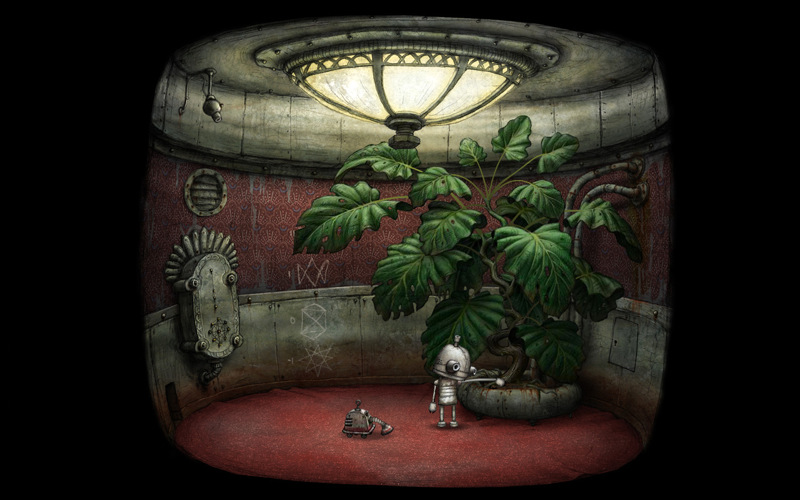 When touch screens became a viable input device for the games industry, the consensus was that point-and-click adventures would be a natural fit. This is particularly true for Machinarium: Amanita decided to limit players’ range of motion to a few actionable hotspots in each area. In other words, Machinarium dispels the need for super-precision touch controls — the game is designed to require as little movement as necessary.
Machinarium, as a whole, is remarkably tidy. It begins with an unnamed protagonist being dumped, rather unceremoniously, on the outskirts of a city whose skyline is dominated by an ominous spire; it ends with a flashback of the events that set the game in motion in the first place. The puzzles employ a similar rolling structure: each puzzle is discrete and self-contained, but the game as a whole is tightly paced and given momentum by a set of smart, complementary design choices.
First: solving any given puzzle in Machinarium generally results in the acquisition of another inventory item that — unbeknownst to the player — will be critical to a later scenario. Secondly: though the town square acts as a hub for the gameworld, the bulk of Machinarium’s puzzles take place inside individual rooms or buildings, i.e. on a single screen. The result is that players enter each area already armed with the necessary tools and aren’t forced to travel very far to solve puzzles. Like a shark, Machinarium thrives because its design encourage progress, not stagnation — every step.
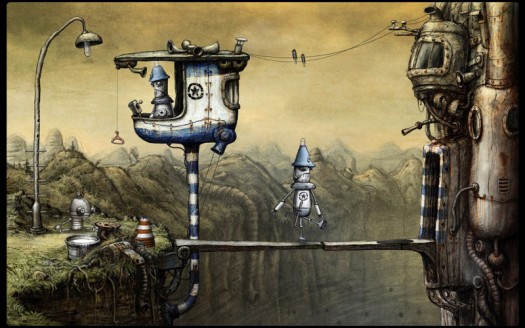
My only real hiccup with Machinarium’s high-level dynamics is that the gameworld doesn’t always do enough to inform or motivate the player. For example, an early puzzle tasks players with helping a group of musicians fix their instruments, but the player has no real reason to help them except that they happen to exist in the gameworld. The game’s sparse narrative components are great when it comes to contextualized story telling, but they don’t particularly account for the player’s need to, say, fix someone’s didgeridoo. Instead, it’s design by tautology: Machinarium is a puzzle game, so it should include puzzles.
Everything else in the game is beautifully realized. The puzzles, full of circuitboards, waterworks, and mechanical tinkering; the protagonist’s evocative animation; the mournful soundtrack — all of these things exist to sell the idea that a world populated entirely by robots could be plausible, and that this particular robot has something important to contribute to it. Nevertheless, there are several moments — even after you discover the game’s central conflict — that are aren’t necessarily tethered to any kind of narrative or in-game logic: puzzles are solved because they simply exist, not because it’s clear that they somehow contribute to one robot’s quest to save his city from … well, bullies.
Bullies, of all things. How quaint, right?
And maybe that’s why we had to help those poor, broke musicians — because Amanita Design hopes that we’re just nice people. That Machinarium is, give or take, a beautifully evocative story about playground bullying should indicate the kind of charming, understated game it is. Even the name, Machinarium, suggests a mysterious, whimsical place — I do hope you explore it.


Unity is cool and I'm glad you guys are covering it. Just curious ... why don't you also cover Corona SDK for 2D development?
There's actually a couple cool sdks out there for 2d development using Unity. One is ex-dev, and there's another one that is free... but the name escapes me at the moment.
Mostly because developers are using Unity right now to make some incredibly cool games, and it's amazing how the same engine that's used to make "next-gen" games like Shadowgun can be downloaded for free and used by total amateurs with surprisingly good results. I can't really think of a Corona SDK game that has ever blown my hair back.
I see your point Eli. I do like that you have reviewed games created with Corona SDK though. Regarding the discussion below, I agree that while these tools are great, they're no substitute for good design, a lot of attention to detail, and some hard work.
Thanks for the response.
Yea! Why don't you cover Cocos2d, or GameSalad, or all the other game engines out there?
OOOOH, that's right. You are a game reviewing website... not an iOS developer tips website.
Unity is an amazing system. I prototyped my game in about 2 weeks, including the 3D modeling, texture art and sounds, which is pretty good considering it was already built in a 2D engine and I wasn’t going to compromise by doing only what was “easiest” in Unity—I simply wanted to re-create the concept in 3D. Great result, and most of it was working early into week one. Now, if only I could make time to build all the levels and polish it up...
Uh, prototyping a game in 40 minutes is easy if you don't care how polished the end result is. Considering that they the game they made had a floor and a couple of bowling pins that you threw a ball at... color me not impressed.
Now add in the old addage that the first 90% of the work is easy. It's the second 90% where it really gets hard. The final 90% is even harder! I other words it's easy to prototype a crummy version of a game in an hour, weekend, (whatever) but by the time you add all the final art, polish, sounds, menu screens, social integration, etc, etc, etc that people expect from a game you've spent way way longer. There is no silver bullet!
tell that to the 99% of the app developers out there that release stuff that's supposed to pass as a 'game' every day.
Even the crappiest game probably took hundreds of man hours of work.
You know one day, you had to write your own file loaders?..... :rolleyes:
I think it goes without saying that hours and hours of polish are necessary to create a finished, sellable product. This demonstration was for parents, kids and non-developers who were curious about "how to make games" in general. They're looking for a place to get started.
But regardless, it is still faster to prototype and polish things in Unity. If you happened to watch the whole video, you probably got the point about how variables are exposed to the Unity editor. In terms of refining gameplay, being able to really quickly adjust values makes a huge difference. The nature of how you can see exactly what you're getting also saves lots of time in that department. :)
Your argument is nonsense. A prototype != a finished game. Polish isn't even part of the goal here. This was a demonstration for non-developers, not an attempt to sell Unity as a 'silver bullet'. Nothing was misrepresented, and you don't have to be impressed.
It's called the 80/20 rule. The last 20% takes 80% of your time.
That's what the word prototype means.
Im sure I will get round to creating an app someday. One of my (many) plans :) Its good to see so many different kits to help create apps out there.
I think this is a little disingenuous. Sure, if you've got the game mechanic and graphic assets all ready and you pretty much know what code you are going to write you can write a demo in a few hours, but a real game takes months no matter how clever the SDK. A huge part of writting a game is not the game itself but the *editor* which allows you to design levels. This is often a much more complex program than the game itself. And then there's the designing of the levels. Even 99c apps often have 100s of levels which must take several hours each to prepare and test.
I think programming in Unity (or rivals Corona) is much faster than in native objective C but you're still looking at 10,000 lines of code for a game + editor and thousands of graphics files. This does not take 40 minutes.
Hello. :)
Not sure if you were watching the video very closely, but as I explained Unity is also an editor. You can design levels by using Unity without having to write any extra code. In some cases it can be helpful to write editor scripts to make certain game-specific level editing tasks easier. But you DON'T have to write your own level editor from scratch, and you certainly don't have to write anywhere near as much code as you used to.
I don't get the negative comments about this video.
He's not describing how to make a AAA title in 40 minutes. He's giving an overview of "core concepts" related to game development. He's addressing the crowd that might have an idea for a game, but has no idea what an "IDE" is or what "FPS" (frames per second, not first person shooter) means. He's simply showing what the different pieces are to making a game, and how they come together to create something usable. That makes perfect sense to show in 40 minutes, so he did. He's addressing people who have likely never written a line of code, which you can tell by the fact that he assumes the scripts he is writing will be confusing for the audience. What he's doing is facilitating the "Ahah! So THAT's how code makes things happen in the game world!" moment, which the audience clearly hasn't had yet. But he's saving you the hours you would spend floundering around helplessly if you had never done anything like this before.
And yes, you can prototype gameplay in 40 minutes if you have a clear idea of what you want. I did this recently, in fact. I was working on a space sim... my question was whether or not to use the physics engine for controlling the ship, or manually move the ship, and ignore physics, or only activate it under certain collision conditions... I won't go into the details, it's long. I don't have any ships, I don't have any astroids, I don't have any textures... and I suck with art, and it would take me hours upon hours to scratch the surface of just beginning to make these things. So, I went on to the Asset Store, found a ship, found some astroids, and took some textures from other free demos. I threw it all into one project - and wrote the code for 2 different control schemes. Was it a triple AAA title? No, that wasn't the point - I got a prototype for 2 versions of what I wanted to test in about an hour, and got a concrete answer to my question which helped me move on to and solve other design issues.
Yes, if you are serious about game development you are going to spend countless hours on what are seemingly minute details. If, however, you are just entering the world of game development and are utterly lost on where to start - this is a brilliant video.
Take it for what it is. If you're a pro, move on. If you are just starting, watch it 5 more times, then download Unity and visit www.unity3dstudent.com and work through the little 5 minute tutorials. It may seem childish, but you'd be surprised how quickly you can learn something useful and make functioning prototypes, starting from knowing absolutely nothing.
And, if at the end of the day you decide you don't want to use Unity, or it doesn't do what you want to do - that's fine. You can ditch it and use some other engine, but you will have learned a core set of concepts about game development in general.
I liked it probably going to check it out later , but i kinda love being swallowed by lines lines of code >,<
Very nice video, thank you. I'm looking forward to make a game prototype and i think Unity is my tool.