Apple Releases iPhone 2.2 Firmware
posted November 21st, 2008 1:57 AM CST by arn in News
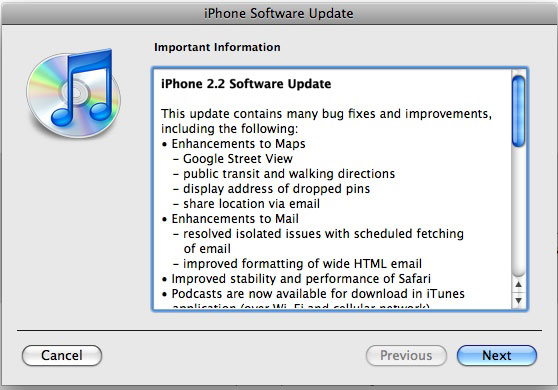
Apple has released the version 2.2 update for the iPhone and iPod Touch. The new updates is available in your iTunes software update. The new changes found in 2.2 include:
- Enhancements to Maps
- Google Street View
- public transit and walking diretions
- display address of dropped pins
- share location via email
- Enhancements to Mail
- resolved isolated issues with scheduled fetching of email
- improved formatting of wide HTML email
- Improved stability and performance of Safari
- Podcasts are now available for download in iTunes application (over Wi-Fi and cellular)
- Decrease in call set-up failures and call drops
- Improved sound quality of visual voicemail messages
- Pressing the Home button from any Home screen takes you to the first Home screen
- Preferences to turn on/off auto-correction in Keyboard settings
More notably, Firmware 2.2 fixes the issue with broken App Store links in Mobile Safari. The new version allows readers to click directly to apps that we link to.


November 21st, 2008 at 2:17 am
I'm noticing that every picture that I have saved on my iPhone from Mail or Safari is showing up in Photos on 2.2 pixellated and blurry. I even viewed a photo in a Mail message after the upgrade, saved it, went to Photos and saw a messed up pic. Not good, Apple.
November 21st, 2008 at 2:26 am
@Scott Johnson
Let's blame Vista!
November 21st, 2008 at 3:16 am
I like that pressing the home button brings you to the first screen. Still, I'd prefer categories.
November 21st, 2008 at 3:43 am
Categories would be great, can't believe they still haven't made at least some kind of folder system or something.
I can't find street view on google maps….
November 21st, 2008 at 3:53 am
Street view is available when you drop a pin. There's a new icon on the left of the title on the pin.
Categories would be awesome! Sucks we only get 9 screens to fill up.
November 21st, 2008 at 4:05 am
I don't think street view is on the iPod Touch, only the iPhone for some reason. App store is upgraded…can view all screenshots, so those silly people who put the title screen as the first screenshot don't look so silly anymore.
November 21st, 2008 at 4:15 am
Oh my! sucks that we ONLY get 9 screens to fill up???? come on!!! if you took away all the shit from your iphone and only go with the god stuff you would have more then plenty of pages left.
November 21st, 2008 at 4:19 am
Argh!!! Still the 9 page limit? This sucks!!
I have paid apps I can't have on my phone due to this limit. I'm not talking free stuff, but paid ones, that I (or the kids) want to use.
I've limited my buying lately, PURELY because of the 9 screen limit.
Come on Apple, I know you have to take awhile to redesign the system to handle categories or whatever, but I at least thought 2.2 would address the app count limit.
November 21st, 2008 at 5:00 am
> More notably, Firmware 2.2 fixes the issue with broken
> App Store links in Mobile Safari. The new version allows
> readers to click directly to apps that we link to.
Woo-hoo! Finally! No more having to browse a site, remember the name, close the site, open the App Store, go to Search, type in the name, find it amongst the results, click on it, and THEN get taken to the app's page…
November 21st, 2008 at 5:05 am
> Jesper Says:
> Oh my! sucks that we ONLY get 9 screens to fill up????
> come on!!! if you took away all the shit from your iphone
> and only go with the god stuff you would have more then
> plenty of pages left.
That's your opinion, and an ill-informed opinion at that. Not to mention terrible grammar.
For the precise reason that we still can't categorise our apps, I make my own categories by putting all similar apps or game on one screen: One screen per category.
So that means that whilst some screens are full, with 16 icons, some other screens have maybe only 6 or 7 icons - therefore, not all my screens are full.
If Apple doesn't give us categorisation, we have to make our own. And if we have to leave empty spaces on some screens in order to achieve this, then we'd like more screens.
Is that really so difficult for you to understand?
November 21st, 2008 at 5:32 am
Brett Archibald. You're funny. You talk about his "terrible grammar", LOL you should learn how to spell first. HAHA. It's categorize jackass. Anyways so what if he wants more than 9 screens. Although my stuff is separated into pages, categories would make it a lot more organized.
November 21st, 2008 at 6:02 am
@Weener: "learn how to spell first", I would offer the same suggestion to you. Have you ever heard of International English?
November 21st, 2008 at 6:13 am
@ Weener:
It's only spelt that way if you're American.
(Or would you prefer it if I said "It's only *spelled* that way…"?)
@ James:
The phrase "International English" really bugs me. I'd prefer it if people referred to the language that Americans speak as "American English".
November 21st, 2008 at 6:20 am
And anyway, it's not "jackass", it's "jackarse"!
Ha ha, just kidding of course…
November 21st, 2008 at 7:36 am
no fair I wanna try 2.2 so badly with the google street view
can't upgrade till its jailbroken, man gonna be a huge process redoing my phone. Also if you did jail break your phone in cydia they have the app catagories so you can have more apps than normal and put apps is folders.
November 21st, 2008 at 10:05 am
The App Store now displays multiple screenshots, and they are full-screen. WooHoo!
November 21st, 2008 at 11:07 am
Can people discuss the topic on hand and not get into pissing contests over who can spell better than the other?
Grow up.
November 21st, 2008 at 12:04 pm
Here's a writeup of the problems with the Photos app that I'm seeing in 2.2: http://bit.ly/iphone22
November 21st, 2008 at 12:21 pm
so is 2.2 worth the download as of yet?
November 21st, 2008 at 3:50 pm
From Scott's post, sounds like I'm going to wait for version 2.2.1
November 21st, 2008 at 4:23 pm
Oooooh. I can't wait to play this game! Does it have online high scores?
November 21st, 2008 at 6:24 pm
Any chance that 2.2 gets rid of the bugs that pop up when you DL using the iPhone app store? I haven't even bothered getting apps any way other than grabbing them with iTunes on my PC and then syncing. I can't be bothered to deal with the 'open apps and then they close' nonsense.
November 21st, 2008 at 7:27 pm
When you update an app it doesn't make a second one: it puts the update bar on the original!!!
November 21st, 2008 at 8:11 pm
lol @ Brett Archibald talking about poor grammar, and then he begins a sentence with a conjunction
noob
November 21st, 2008 at 10:03 pm
Anyone know if 2.2 fixes the multiple system sound audio "spike" glitch?