 It’s been a little over a week since Stardew Valley ($4.99) arrived on iOS and the productivity level of millions of people around the world plummeted. Yes, bringing a game that’s this life-sucking to a device that you can take with you everywhere was a cruel trick indeed, but I can’t thank the developers enough for doing so. About the only caveat with the mobile version of Stardew Valley was that the game’s default tap-to-move control scheme was not to everyone’s liking. Especially on the iPhone where things were much smaller and “fat-fingering" an incorrect action could be really frustrating. Well, original developer ConcernedApe and publisher Chucklefish have earned quite a reputation for taking in player feedback and being extremely responsive to it, and now the company that they recruited to port Stardew Valley to mobile The Secret Police is following in those same footsteps. Just prior to the game’s official launch the mobile developer responded on Reddit that new control schemes were in the works, and today we have our first look at just what those are. And boy howdy are there a lot of options coming. As outlined on the official Stardew Valley wiki page:
Tap-to-move & Attack Joystick
This is the default tap-to-move control scheme but rather than have you auto-attack when confronting enemies in the mines, with this option a special attack control stick will pop up when a weapon is selected and you can drag in any of the four cardinal directions to swing the weapon.
Invisible Joystick & 2 Buttons
This is by far the control scheme I’d hoped most would be implemented into the game. Basically the left side of the screen is a big invisible joystick that will center itself wherever you place your thumb. On the right side of the screen are two simple virtual buttons, with zones that extend well past the actual button itself as seen in the screen below, that act as “use tool" and “perform action" buttons.
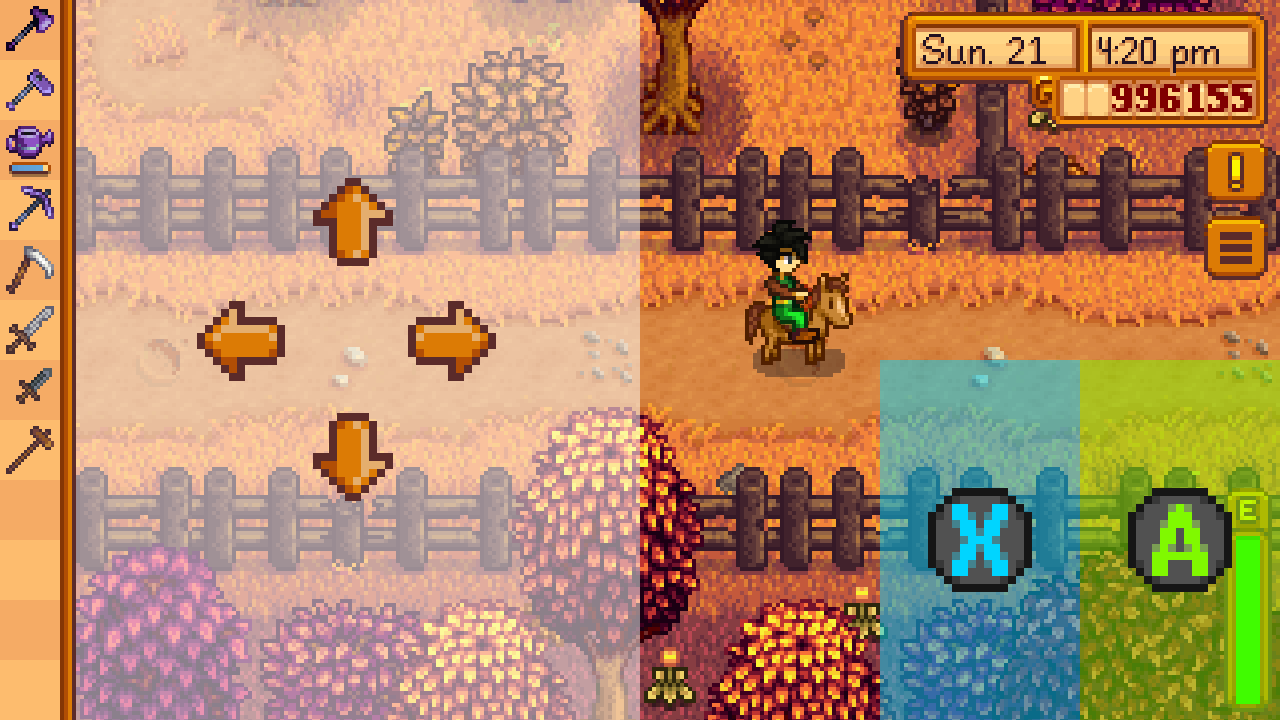
Invisible Joystick & 1 Button
This is for the supreme minimalists out there. You get the same left side of the screen invisible joystick as in the previous option, but rather than two virtual buttons on the right side of the screen the entire right side of the screen itself is just one big button that does double duty. A quick tap on that side will trigger “use tool" and a longer press will trigger “perform action."
Tap-to-move + Joystick & Buttons
This is for those who want it all. It’s the virtual stick and buttons option but ALSO tap-to-move works everywhere except if you tap on the virtual controls. There will also be a variation of this option that only brings up the virtual controls when a weapon is selected, and one that is tap-to-move with a virtual stick for movement only and no buttons.
I mean, did these guys go overboard or what? I can’t imagine anyone thinking of a control scheme that isn’t included in the ones up there, unless some maniac out there wishes for a tilt-to-move scheme. There will also be a new option to toggle a button on the screen that allows you to show and hide the controls on a whim. When you enable it it’ll display whatever control scheme you have selected from the options, but when you disable it it’ll switch everything to the default tap-to-move and auto-attack controls. No word on when exactly this update will be coming, but it sounds like it’ll be fairly soon.

Awesome news, and yes, not surprised at all about their user-responsive updates.
Now if only I could catch a damn fish!
Think it's fine as is. However, just fix the fishing, as it's quite possibly the worst game mechanic I've ever seen.
Read there's also fix to fishing
Sorry, I don't understand what you mean?
Just to clarify, all mentions of “joystick” refer to an on-screen approximation of the real thing. So, no mention of MFi controllers yet.
Awesome options! This will definitely make getting around more enjoyable. Now, I too would like to see them come up with a better fishing control mechanic.
Maybe I'm the only one but I actually like the fishing mechanic... It represents the act of reeling in a fish that is trying to escape in a simple, but effective way. At least in my opinion. It's pretty easy once you get the hang of it, and I've made like a third of my profit from fishing...
Okay so any tips on tapping or placing that green box?
For all levels the key is using short and quick taps to finely pinpoint where the green box is. Long taps usually mess you up since the box tends to bounce off the ends. Some fish will zoom so fast it's impossible but with practice you can catch most of them.
Depends on your fishing level but early on just keep the bar it mainly at the bottom and then as you progress I find it good to immediately move the green box to around the centre at the start as the fish normally jumps there.
Good luck fishing!
Thanks!
FOCUS ON THE EYE! No, really... I found out that the best way to fish is to aim at the fish's eye. Try to keep the green bar on the fish's eye as much as you can. Just don't tap frantically, also try to "hold" the fish sometimes.
I used to HATE the fishing mechanics with every gut I have. But now I like it. You only have to get used to it. Actually, this is the only mechanic truly challenging in the game. Combat, on the other hand, is way too easy. No challenge at all.
P.S.: I found out that the best way to fish is to aim at the fish's eye. Try to keep the green bar on the fish's eye as much as you can. Just don't tap frantically, also try to "hold" the fish.
I'm hoping they will add in an auto save. Work, wife, dogs, etc. just too many things come up where I have to stop and don't have time to get back to the bed.
They need to fix the crashing in the mines. Has happened half a dozen times, to me, now. I thought the 1.03 patch would have fixed it, but it remains. There is also a tile, going into the home area that often makes your character turn around. Then, there is an issue with placing crab pots on diagnals as some locations cannot be filled or retrieved. Pathfinding getting stuck, in the mines, barn, and coop. Has lead to a few of deaths, in th mines.
I'm glad they're adding more control schemes, although I'm disappointed that controller support isn't one of them.
But since my MFi does work already except for the action button, maybe I can use that with one of the control schemes that puts the action button on the screen? I could live with that.
Touchscreen-only controls in real-time games aren't a bad thing, but I never can get used to them and it's often a dealbreaker for me.