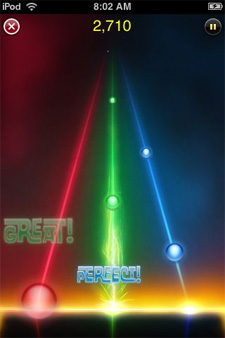
 Dance Dance Revolution fans will be pleased to learn that a great looking iPhone take on that match-the-beat classic is headed to the iTunes App Store. iPhone developer Nate True has sold his popular iPhone jailbreak title Tap Tap Revolution to a new company called Tapulous who have renamed it Tap Tap Revenge. True was hired on as a developer at Tapulous to expand the game’s featureset and maintain it as it makes its debut in the App Store.
Among the new features added to Tap Tap Revenge are an overall new look, which True indicates is still evolving, an interesting head to head mode that allows two players (or one frighteningly dextrous player) to battle it out for the title of Rhythm King, and some degree of accelerometer control (as can be seen in the YouTube video), but we don’t have details on the last. One feature that was dropped from the jailbreak original is the iTunes Library option which allowed gameplay using any song in a player’s library. True indicates that iPhone SDK restrictions forced this omission, but the he has “a sneaking suspicion that it won’t be gone forever."
Tapulous hopes to have Tap Tap Revenge available for download on App Store launch day, July 11. And the best news of all? It will be free–“at least to begin with," cautions True. So grab it early, folks.
[ via TUAW ]

WARNING: The update takes Cydia off your iphone, it also takes off any apps you downloaded.
I used Make it Mine to change my carrier name, the change is still there
I used Poof to hide the icon of a few apps, They are still gone but I have no way of using them now
you will not be able to rejailbreak your until the dev team puts out an update
Uhhhh... duh....
What were you expecting? You updated using a non-pwnd firmware.
And yes you can downgrade and rejailbreak to 2.0
Why would you even update your iPhone if you jailbroke it? If you've jailbroken your phone you need to realize that you can't update until the dev team releases a way to jailbreak it.
@ jpyre
That wasn't a "OMGz I upgraded my phone and it's not jailbroken anymore" kind of post.
It was a reminder that if you are on jailbroken you do not want to upgrade because the changes that are made are still present even though you the apps disappear. Although SSH doesn't seem to work for me.
Yes you can downgrade, but then you aren't on 2.0.1 are you? If you are upgrading to 2.0.1 it's because 2.0 wasn't running very well. Also, the dev team made it incredibly simple to jailbreak your iphone. It's literally a 3 click process now. So there is good chance that people won't know how to downgrade.
@Michael
I always upgrade to the newest firmware when it comes out and then document what happens to jailbroken phones. I have a first gen iphone and a 3g so if it bricks my first gen It's not a big deal because there are so many ways to unbrick it and start over on an older firmware
First, people that are jailbroken should know all this already, if they don't they shouldn't be jailbreaking. You've had to WAIT for pwnage tool to be released EVERY firmware revision NO EXCEPTION, why would that change now?
Second, I never have, and never will, "Upgrade" my phone for this reason. I choose to "Restore" so stuff like this doesn't happen, even by accident.
Third, YOU could RESTORE to 2.0.1 as it sits now and your issues will dissappear OR downgrade to 2.0.0 and re-jailbreak and wait for pwnage.
Fourth, iPhones don't get bricked, never have, never will, it's a myth, people just don't know how to use DFU restore.
Lastly, your original post makes it seem like 2.0.1 deletes apps, it doesn't, all 2.0.1 did was make sure that the apps have a valid certificate, which Cydia (and others) doesn't, so it's there, it's just not capable of being displayed and/or run.
It wouldn't change now but there is a sizable amount of new iphone users now that have no idea what they are doing. After the update came out I was on Twinkle and saw at least 10 people crying about their apps being gone. So please don't fault me for wanting to make sure that when someone read arn's post about the update they were reminded to not upgrade if jailbroken.
Poof! is used to take icons off the springboard while the app is still able to be used. That is what I was referring to the being gone but not being able to use them. I no longer have the Ipod icon but I can still double tap my home button to use it.
As for restore and DFU... You're completely right. It's that simple. BUT, people that use restore instead of update and know how to use DFU are the same people that know enough to not update in the first place. They need no warning.
When the first sim unlocks were coming out the only free version was through the command line. It ended up changing your baseband. When the next update came out (I believe it was 1.0.2 but i'm not sure) it changed your imei number. You could still turn your phone after DFU but if it didn't have a legitimate activation you were stuck on the activation screen. Since your imei changed you were stuck with a completely useless $600 brick for about 2 weeks or so until programs were released to change your imei back through command line